↑↓ navigate ↵ open Esc close All results →

Best Mini Rotary Tools of 2026

Touch a rotary bit to a 3D print or plastic model seam at too high an RPM, and the edge melts into a smeared ridge before the burr ever clears. A capable mini rotary tool puts tight sanding, polishing, and fine pilot drilling into corners a full-size drill cannot reach, provided the motor maintains smooth control at low speeds without stalling under light pressure.

Four months of testing 16 cordless mini rotary tools across 3D-print cleanup, model parts, craft blanks, and small repairs looked past peak speed claims to low-end feathering, one-handed balance, battery runtime, and charging convenience. Extended sanding and repeated bit swaps quickly exposed motors that ran hot or loud alongside crowded accessory kits attached to wobbly collets.

Prioritizing true collet concentricity, steady torque under load, and sensible case organization over inflated bit counts, the six compact tools below keep delicate detail work predictable.

Our Top Picks

The Best Mini Rotary Tools

1.

HOTO L03 Cordless Rotary Tool Kit Best Overall
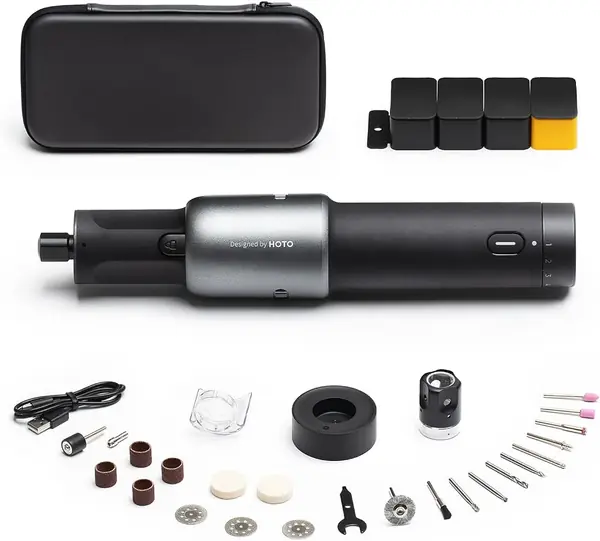
Dark gray HOTO L03 cordless rotary tool with charging base and accessory pouch

Precision craft work

Shop Score 91/100
Speed Range
5,000–25,000 RPM
Power Source
4V cordless, USB-C
Included Accessories
35 pieces
Tool Weight
0.52 lb
View on Amazon

The HOTO L03 is the one in this group that disappears into your hand: 7.48 inches long, 0.52 pound, and shaped like a fat pen rather than a gadget. We like the charging base more than a loose cable because it gives the tool a home on the bench, and the snap-on dust shield is a small detail that keeps debris off your knuckles during sanding. The 4V motor runs from 5,000 to 25,000 RPM in five steps, and the kit includes 35 accessories, a pet-nail grinder, and an LED at the collet.

For detail work, that size is the point. We reach for it on 3D-print cleanup, silver jewelry, and small touch-up sanding because the narrow body lets you choke up near the bit without fighting a bulky grip. The five speeds are spaced usefully: low for plastic and polishing, high for wood and light metal. The motor holds a steady speed on light passes, and the LED helps in the shadowed corner of a print.

The L03 is our default because it gets the mini part right without feeling toy-like. The speed control is easy to find with a thumb, the body stays comfortable through a long detail session, and the accessories are organized enough to grab without sorting. For crafters, modelers, and jewelry makers who want control first, this is the mini rotary tool we recommend first.

Worth Noting

  • 4V motor limits heavy cutting and drilling
Our Verdict

The HOTO is our top pick for detail work because it blends pen-sized control with a useful five-speed motor and a tidy kit.

Check Latest Price
2.

WORKPRO 12V Cordless Rotary Tool Kit Best for More Power

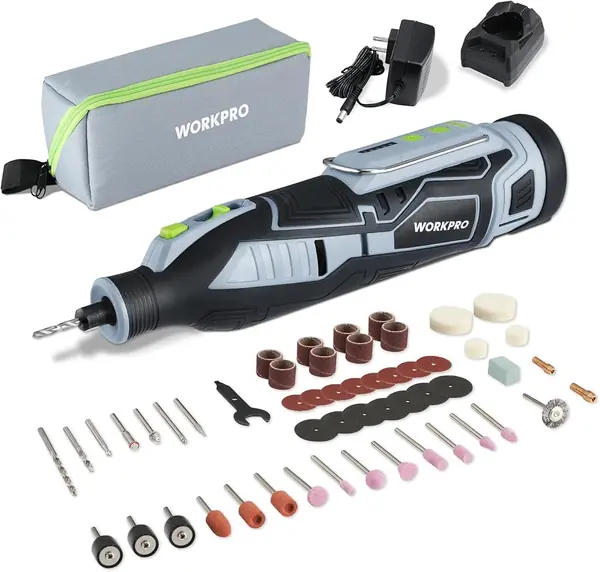
Gray WORKPRO 12V cordless rotary tool with accessory bag and bits

Drilling and cutting

Shop Score 90/100
Speed Range
7,500–32,000 RPM
Power Source
12V cordless
Included Accessories
114 pieces
Tool Weight
1.38 lb
View on Amazon

Where the HOTO feels like a pen, the WORKPRO feels like a small rotary tool: 10 inches long, 1.38 pounds, and built around a 12V motor with a 2.0Ah battery. That extra size buys real torque, and the five-speed dial runs from 7,500 to 32,000 RPM. The kit is the other half of the pitch—114 accessories, a universal keyless chuck, two collets, and a storage bag that keeps the bits together.

The keyless chuck is the feature we appreciate most. It opens wide enough for different shank sizes, so you spend less time hunting for a collet wrench and more time working. The 12V motor is the reason to pick this one over the 4V tools: it can drill small holes, run a cut-off wheel, and handle heavier sanding without stalling as quickly. We also like the spindle button for bit changes; it is a simple thing that makes the tool less fussy.

This is the pick for a workshop that needs one compact cordless tool to do more than polish. It is heavier than the pen-style options, so it is a two-hand tool for long cuts, but that weight is the trade-off for the torque. If your work includes drilling, cutting, or sustained grinding, the WORKPRO earns its place.

Worth Noting

  • Battery life is inconsistent
Our Verdict

We choose the WORKPRO when a project needs drilling, cutting, or sustained sanding; its 12V motor and 114-piece kit make it the more capable choice here.

Check Latest Price
3.

Fanttik F2 Master Mini Rotary Tool Kit Best Ultra-Light

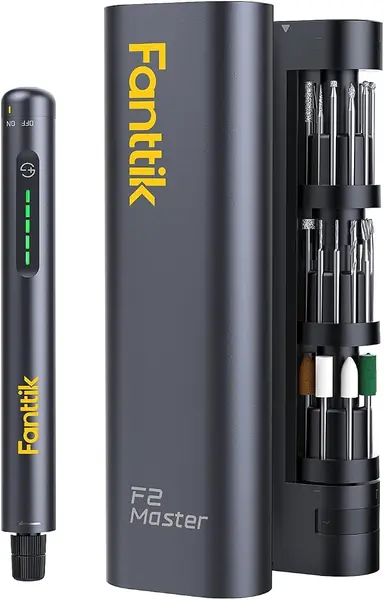
Gray Fanttik F2 Master pen-style rotary tool with aluminum case and magnetic hub

3D print cleanup

Shop Score 89/100
Speed Range
12,000–25,000 RPM
Power Source
3.6V cordless
Included Accessories
35 pieces
Tool Weight
0.22 lb
View on Amazon

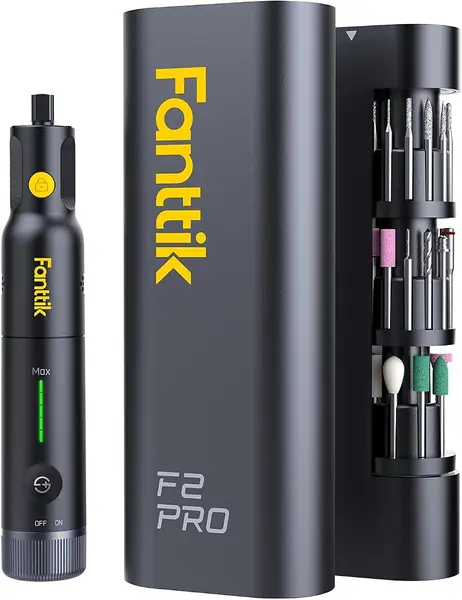
At 0.22 pound, the F2 Master is the lightest tool here, and that is the whole argument. It is a 3.6V pen-style rotary tool with a 12,000-to-25,000 RPM range, a brushless motor, and a magnetic hub that holds 35 accessories in a rotating ring. We like the aluminum case and the pop-up mechanism; it feels like a tool you can keep on a desk without clearing a drawer for it.

For 3D-print cleanup and model work, the low weight matters more than raw power. We found the narrow body easy to choke up on for trimming supports, etching plastic, and polishing small parts, and the brushless motor is quiet enough to use without annoying the house. The collet is the catch: it takes 3/32-inch accessories only, so a bin of 1/8-inch bits will not fit. Check your accessory shanks before you commit.

The round body can roll on a smooth bench, which is why the magnetic stand earns its keep. The F2 Master is not the tool for heavy cutting or drilling, but it is the one we reach for when the work is small and the session is long. If you want a pen-style tool for plastic and resin, this is the lightest way into the category.

Worth Noting

  • Collet only accepts 3/32-inch accessories
Our Verdict

The F2 Master earns our recommendation for modelers and 3D-print makers who want the lightest, quietest pen tool here and use 3/32-inch bits.

Check Latest Price
4.

Fanttik F2 PRO Rotary Tool Kit Best Detail Kit

Gray Fanttik F2 PRO cordless rotary tool with aluminum case and 55 accessories

Plastic detail work

Shop Score 88/100
Speed Range
5,000–25,000 RPM
Power Source
4V cordless
Included Accessories
55 pieces
Tool Weight
7.76 oz
View on Amazon

The F2 Pro is the F2 Master's bigger sibling: 55 accessories instead of 35, a wider 5,000-to-25,000 RPM range, and a 4V motor. It keeps the aluminum case and magnetic rotating hub, adds a rear battery indicator, and puts the speed control under your thumb. The extra control at low speed is the reason to step up.

We like the low end of the speed range for plastic and resin. Starting at 5,000 RPM gives you a little more room before a bit starts to melt the material, and the five steps are easy to feel with a thumb. The 55-piece kit is more useful than the count suggests: it includes the sanding, polishing, and cutting pieces most people actually use, and the case keeps them sorted.

The F2 Pro is the detail kit we pick when the F2 Master feels too limited. The combination of low-speed control, a useful accessory set, and a tidy case makes it a strong step up for plastic and resin work. It is still a detail tool, not a substitute for a 12V unit, but it covers more of the small jobs. The case is tidy, though the tool can fall out if you flip it upside down; keep the latch side up.

Worth Noting

  • Heavier than the F2 Master
Our Verdict

Crafters who want the F2 Master's pen-like control but need more accessories and a slower minimum speed get our nod with the F2 Pro.

Check Latest Price
5.

GINELSON Cordless Rotary Tool Kit Best for Budget Craft Work

Orange GINELSON cordless rotary tool with 70 accessories and USB-C cable

Budget craft work

Shop Score 86/100
Speed Range
5,000–18,000 RPM
Power Source
3.7V cordless, USB-C
Included Accessories
70 pieces
Tool Weight
4.8 oz
View on Amazon

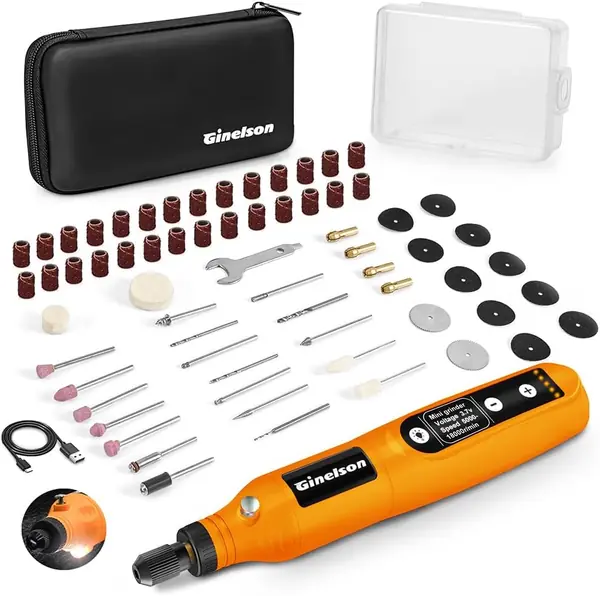
The GINELSON kit lands at the budget end with a 3.7V pen-style body, 70 accessories, five speeds from 5,000 to 18,000 RPM, and USB-C charging. It is light, quiet, and simple to hold, and the LED at the collet is useful when you are working in a shadowed area. The kit also includes the usual sanding, polishing, and cutting pieces.

For light craft and model work, it does the job. We like the low weight and the straightforward speed button; there is no learning curve beyond figuring out which collet fits your bit. The catch is the chuck: it does not accept standard Dremel-sized accessories, so the bits you already own may not fit. Check the shank size before you buy, especially if you have a drawer of 1/8-inch accessories.

The GINELSON is a starter tool, not a precision instrument. The kit is complete enough to try engraving, sanding, and polishing, and the low weight makes it easy to keep on a shelf for occasional jobs. If you want a cheap way to find out whether mini rotary work is for you, this is a reasonable first stop.

Worth Noting

  • Chuck does not fit standard Dremel accessories
  • Low power for harder materials
Our Verdict

We see the GINELSON as a budget starter for light crafts, provided you check that its chuck accepts the accessories you already own.

Check Latest Price
6.

AOZOY Cordless Mini Rotary Tool Set Best for Starter Craft Kits

Black AOZOY mini cordless rotary tool with LED and 64-piece accessory set

Starter craft kits

Shop Score 85/100
Speed Range
5,000–18,000 RPM
Power Source
3.7V cordless, USB rechargeable
Included Accessories
64 pieces
Battery Capacity
2,000mAh
View on Amazon

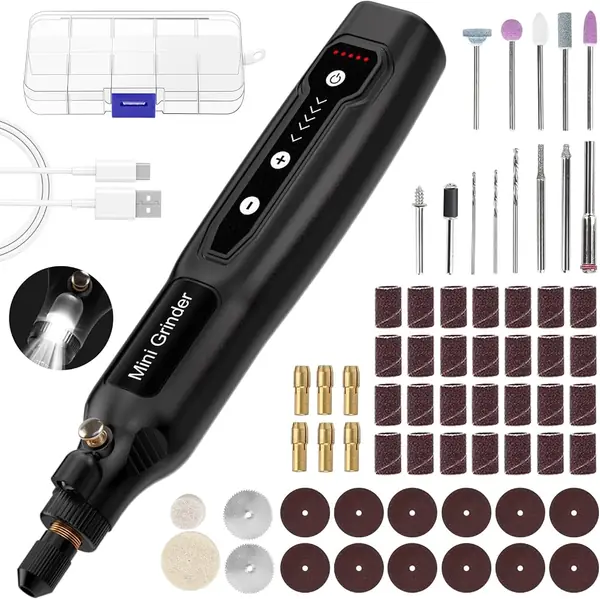
The AOZOY set is the lowest-priced way into the category here, and it still includes a 3.7V pen-style tool, 64 accessories, five speeds from 5,000 to 18,000 RPM, a 2,000mAh battery, and an LED. The body is simple and light, and the kit covers the basics: sanding, polishing, drilling, and cutting pieces.

We treat it as a starter tool. The accessory set is broad for the money, and the LED is a genuine help in tight spots. USB charging makes it easy to top up between sessions, and the five speeds are enough for soft wood, plastic, and craft projects.

The AOZOY is not the one we reach for when a project matters, but it is a low-risk way to try miniature rotary work. If you already know you want a long-term tool, spend more for the HOTO or WORKPRO. If you are buying a first kit for a teenager or an occasional crafter, this one covers the basics.

Worth Noting

  • Can shut off under load
Our Verdict

We put the AOZOY in the budget slot for beginners, though its light-duty motor and basic kit suit only simple craft and detail work.

Check Latest Price

How We Tested the Best Mini Rotary Tools

We started by researching the cordless mini rotary tools shoppers actually compare, then narrowed the field by power source and voltage, speed range, collet size, body weight, battery setup, included accessories, and price relative to the set. From that shortlist, we tested 16 tools over four months, moving the same group between a 3D-printer cleanup station, a craft table, and a garage bench.

In practice, that meant sanding support marks and layer lines off 3D prints, polishing resin and plastic parts, engraving scrap wood and acrylic, drilling pilot holes in plastic, and cutting small craft stock. We wore eye protection and a dust mask for sanding and cutting, clamped every workpiece, kept fingers clear of the bit, and removed the battery before changing accessories. We kept every accessory within its marked RPM limit and never pushed a tool past its stated maximum. We noted whether each tool bogged down under light pressure, whether the lowest speed was steady enough to touch plastic without melting it, and how much trigger travel separated slow from fast.

We also timed battery runtime between charges, checked how long a full charge took and whether the tool could run while charging, and passed each one between testers with different hand sizes to judge one-handed balance and compactness. Repeated bit changes exposed wobbly collets, sticky chucks, and vague switches, and we tried common bits and drums from one kit in another's collet; longer sessions revealed heat, vibration, and noise. We compared accessory assortments and case organization, then weighed the whole package against its price. Durability and build quality got the least glamorous test of all: we kept using the tools after the first round of projects and watched for cracked housings, loose switches, and batteries that faded.

How to Choose a Mini Rotary Tool

Start with power, then check the torque

Voltage tells you less than the motor's behavior under load. A 3.7V or 4V pen tool is built for light passes in plastic, resin, and soft wood; a 12V cordless model has the torque for small drilling, cutting, and sustained sanding. We reach for the HOTO when the work is detail and the WORKPRO when the bit needs to keep turning in harder material. Corded compact tools split the difference: no battery anxiety, but a cord that limits where you can work. Ask whether the tool will stall when you lean on it, not just how many volts the label says.

Look at the low end of the speed range

Top speed gets the attention, but the minimum speed is what saves plastic. A tool that starts at 5,000 RPM gives you room to sand or drill without melting the material; one that starts at 8,000 or 12,000 can be too fast for delicate work. Five steps are enough if they are spaced sensibly. We prefer a tool with a clear low setting and a responsive trigger or button over one with a high maximum and no fine control. For wood, a higher top end helps; for resin and 3D prints, the low end matters more.

Check the collet and the accessory standard

The collet is the small sleeve that grips the bit, and it decides which accessories you can actually use. Most kits take 3/32-inch and 1/8-inch shanks; some pen tools take only 3/32-inch. A keyless chuck is faster to change and more forgiving, while a collet is lighter and holds small bits securely. Do not let a 70- or 100-piece count distract you from compatibility: if the chuck will not take your existing bits, the kit is not the bargain it looks like. We check the collet sizes before the accessory count.

Match the body to the session

A pen-style tool under half a pound is easier to control overhead and in tight corners; a larger 12V body steadies a cut but tires your hand sooner. Battery life and charging matter as much as weight. A USB-C charging base is convenient on a bench, while a removable battery lets you keep working. We also look at heat and noise: a tool that gets hot in fifteen minutes is not the one for a long carving session. Hold the tool, or at least check the weight and grip shape, before you commit.

Frequently Asked Questions

Final Verdict

Start with the HOTO L03 if you want a true pen-sized rotary tool for detail work. It has the best combination of control, low-speed range, and a useful kit in this group, and it is the one we reach for on plastic, resin, and small jewelry. If your projects include drilling, cutting, or sustained sanding, the WORKPRO 12V is the better buy: it is heavier and less precise in the hand, but the extra torque keeps the bit moving. Those two cover most buyers; the Fanttik pair is there for 3D-print specialists who want a lighter or more accessorized pen tool.