↑↓ navigate ↵ open Esc close All results →

Best CNC Router Spindles for Hobby CNCs of 2026

The spindle is the part of a CNC router that actually touches the wood, and usually the first thing people upgrade. But the number that decides whether that upgrade happens isn't wattage — it's the diameter of your machine's clamp. Get the mount right, and a modest motor turns a light desktop router into something that cuts oak and aluminum without stalling.

We mounted 11 spindles on our benchtop machines and ran them for eight months on MDF, red oak, and aluminum. A 500W spindle and a 710W palm router aren't interchangeable even when they spin the same bit: the small air-cooled motors run quieter and hold speed, while the router-style ones bring torque down low.

The collet narrows things fast: an ER11 tops out around 7 mm, so 1/4-inch bits put you in a different group. The six picks below cover quiet desktop upgrades, high-power hobby rigs, larger bits, and one kit built around a single machine's control box.

Our Top Picks

The Best CNC Router Spindles for Hobby CNCs

1.

MYSWEETY 500W CNC Spindle Kit Best Overall
MYSWEETY 500W air-cooled CNC spindle motor with 52mm clamp and ER11 collets

Desktop CNC upgrades

Shop Score 86/100
Power
500W
Collet
ER11, 1-7 mm
Mount
52 mm clamp
Top Speed
12,000 rpm
View on Amazon

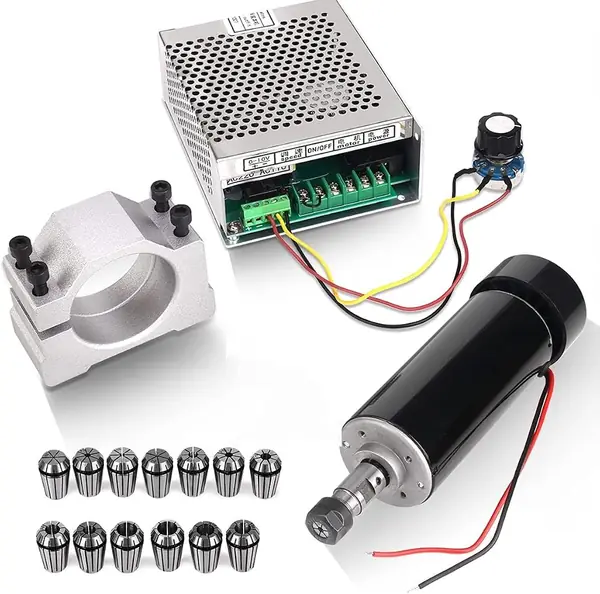
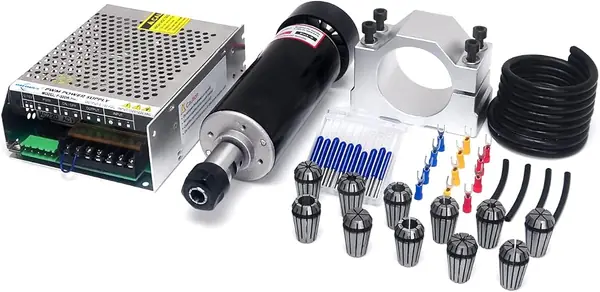
A spindle, a speed governor with MACH3 control, a 52 mm clamp, 13 ER11 collets, and a set of V bits arrive in one box, which is why this MYSWEETY kit is the one we reach for first when a desktop CNC needs a real spindle. The 500W air-cooled motor runs up to 12,000 rpm and takes bits from 1 mm to 7 mm, so it covers the 1/8-inch tooling most hobby routers use.

What we appreciate most is how much of the install is already sorted. The 52 mm clamp is a common size on desktop machines, and the ER11 collet set saves you from buying collets one at a time. The speed governor is the feature that makes this more than a motor: with MACH3 control, you can change spindle speed from the CNC software instead of reaching for a dial mid-job. We also like that the motor is air-cooled and quiet enough for light engraving in a garage or spare room.

The wiring is the part we treat with care: the terminal labels on the governor are sparse, so trace each connection and give the power supply room to breathe before you run a job. For 1/8-inch end mills in wood, plastic, and light aluminum, the 500W motor has enough headroom for everyday hobby work. The 13 collets cover 1 mm to 7 mm, so you can hold everything from a 1/16-inch bit to a 1/4-inch shank without adding a second set.

Worth Noting

  • 12,000 rpm ceiling limits tiny-bit work
Our Verdict

We recommend this kit to anyone upgrading a desktop CNC who wants MACH3 speed control, a common 52mm mount, and a full set of collets in one purchase.

Check Latest Price
2.

Genmitsu 710W Compact Router Best for More Power

Genmitsu 710W compact router with 65mm body and ER11 collet

High-power hobby CNCs

Shop Score 85/100
Power
710W
Collet
1/8-inch ER11
Mount
65 mm
Speed Range
6,500-30,000 rpm
View on Amazon

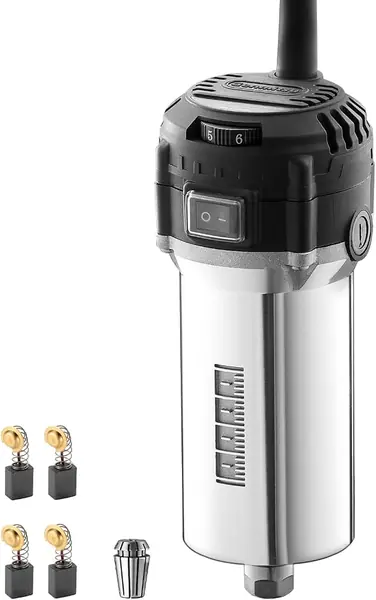
The 65 mm body is the first thing we check on a compact router, because it decides whether the tool drops into an existing CNC mount; this Genmitsu measures 65 mm and adds 710W of power, which makes it the easiest high-power swap in this group. The motor turns from 6,500 to 30,000 rpm in six steps and comes with a 1/8-inch ER11 collet, four spare carbon brushes, and a long 3.5 m cord.

We like the speed range for a hobby shop: 6,500 rpm is slow enough for a large surfacing bit, and 30,000 rpm is fast enough for small engraving bits. The 1/8-inch collet is the common size for hobby tooling, and the long cord is handy when the CNC sits away from an outlet. It is also quieter than a trim router, which matters in a garage or spare room.

For a hobbyist who wants more power and a standard mount without a separate power supply, this is our pick. Check your machine's clamp diameter before ordering; 65 mm is common, but not universal. The four spare brushes are a practical inclusion; keep them in the drawer and routine brush wear will not stop a project.

Worth Noting

  • Manual speed dial lacks MACH3 control
  • 1/8-inch collet limits larger bit shanks
Our Verdict

For hobbyists who want more power and a standard 65mm fit without a separate power supply, this compact router is our easiest high-power upgrade.

Check Latest Price
3.

Daedalus 500W ER16 Spindle Kit Best for Larger Bits

Daedalus 500W ER16 spindle motor kit with 52mm clamp and power supply

Larger bit work

Shop Score 84/100
Power
500W
Collet
ER16, 11-piece set
Mount
52 mm clamp
Top Speed
12,000 rpm
View on Amazon

An ER16 collet is the reason to look at this Daedalus kit: it grips bits up to 10 mm, so you can use 3/8-inch shank tooling that an ER11 spindle cannot hold. The 500W brushed motor runs on 0-100V DC and turns up to 12,000 rpm, and the kit includes a power supply, a 52 mm clamp, and 11 ER16 collets.

We like the ER16 setup for projects that need a bigger bit, such as surfacing slabs or cutting deep pockets where a 1/8-inch shank flexes. The 52 mm clamp is a common size, and the MACH3 and PWM control let you set speed from the controller instead of a dial. The included collet range is broad enough that you may not need to buy another set right away.

The brushed motor is the trade-off: carbon brushes wear and need replacement, so keep the maintenance in mind if you run long jobs. A 3.175 mm collet covers 1/8-inch bits, so the same kit handles both small and large shanks without a second spindle. The 11 collets cover 1 mm through 10 mm, which is the practical reason the ER16 format is worth the extra care.

Worth Noting

  • 12,000 rpm ceiling limits very small bits
Our Verdict

Choose this Daedalus kit if you need an ER16 collet for larger shank bits and want MACH3 control in a complete 500W package.

Check Latest Price
4.

Genmitsu GS-775M Spindle Motor Best Budget 3018 Upgrade

Genmitsu GS-775M 24V spindle motor with 5mm ER11 collet

3018 engraving upgrades

Shop Score 83/100
Power
75W
Collet
5 mm ER11
Top Speed
20,000 rpm
Motor Size
43 x 68 mm
View on Amazon

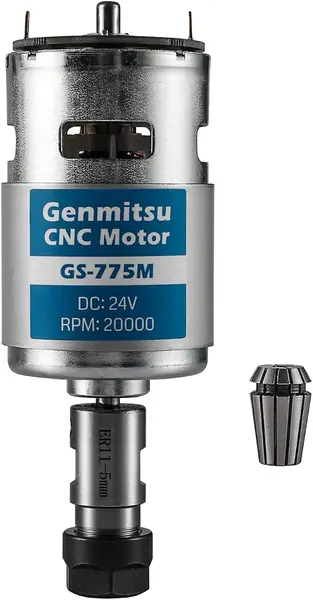
If your 3018 has the original low-speed motor, we think the GS-775M is the least expensive way in this group to wake it up: it spins to 20,000 rpm and runs on the machine's 24V supply. The motor measures 43 by 68 mm, uses a 5 mm ER11 collet, and has double ball bearings and a pre-installed noise-suppression board.

We like that it is a direct fit for the 3018 series, so you do not have to change the mount or add a separate power supply. The higher speed is the real gain: it turns small engraving and drilling jobs from slow passes into quick ones, and the noise-suppression board keeps electrical noise out of the controller. The 75W rating is the boundary to understand. This is a light-duty motor for foam, plastic, and shallow wood engraving, not a replacement for a 500W spindle on a larger machine.

If you want to cut deep pockets in hardwood, step up to the MYSWEETY or one of the 710W routers. For a 3018 user who mostly engraves, the GS-775M is the sensible spend. The included 5 mm collet suits the small end mills most 3018 users run; add a different ER11 collet if you need a larger shank.

Worth Noting

  • 75W motor suits light engraving rather than deep hardwood cuts
  • Included 5 mm collet limits shank size without extra collets
Our Verdict

We point 3018 users to the GS-775M for a cheap, direct-fit speed upgrade for engraving and light cutting.

Check Latest Price
5.

FoxAlien 710W Compact Router Best for 1/4-Inch Bits

FoxAlien 710W compact palm router with 1/4-inch collet and dust hood

1/4-inch bit routing

Shop Score 82/100
Power
710W
Collet
1/4-inch
Mount
65 mm
Speed Range
10,000-30,000 rpm
View on Amazon

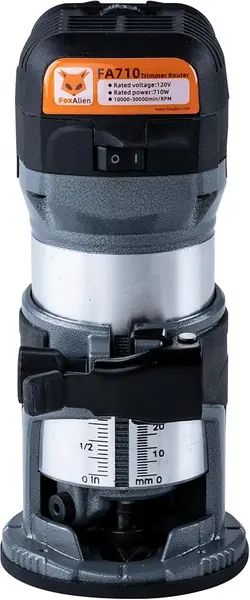
A 1/4-inch collet and a dust hood are the two details that separate this FoxAlien router from the other 710W option here, and both matter once you move beyond 1/8-inch bits. The 710W motor turns from 10,000 to 30,000 rpm in six steps, sits in a 65 mm aluminum body, and comes with a 1/4-inch collet and a push-button spindle lock.

We like the 1/4-inch collet because it opens up larger shank bits for surfacing and deep cuts. The 65 mm body fits the same mounts as the Genmitsu compact router, so if your machine already has a 65 mm clamp, this is a straightforward swap. The six-speed dial is easy to reach when you want to slow down for plastic, and the 710W motor has enough headroom for hardwood.

For a hobbyist who wants one router to handle CNC work and hand trimming, that versatility is the appeal. The aluminum base feels solid, and the push-button lock makes bit changes quicker. The dust hood is the detail we keep coming back to; it turns a messy job into one you can clean up with a vacuum, and it does not get in the way when you use the router freehand.

Worth Noting

  • Manual speed dial lacks MACH3 control
  • 1/8-inch bits need a separate collet
Our Verdict

We like this FoxAlien router for shops that need a 1/4-inch collet and a dust hood in a 65mm CNC-mounted package.

Check Latest Price
6.

FoxAlien 300W Spindle Kit Best for FoxAlien Masuter Machines

FoxAlien 300W spindle upgrade kit with integrated control box

FoxAlien Masuter machines

Shop Score 81/100
Power
300W
Collet
1/8-inch ER11
Top Speed
10,000 rpm
Compatible Machines
Masuter Pro, Masuter 4040, Masuter 3
View on Amazon

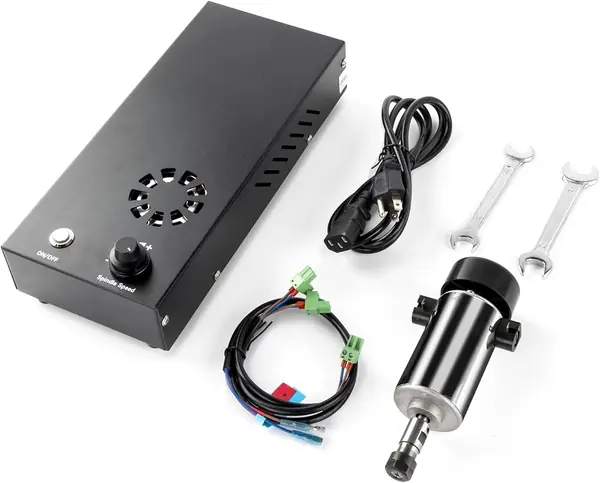
The integrated control box is what makes this FoxAlien kit a true drop-in for a Masuter Pro or Masuter 3: the 48V supply, power switch, and speed dial live in one box instead of a tangle of separate components. The 300W spindle runs up to 10,000 rpm, takes a 1/8-inch ER11 collet, and fits the existing clamp on those machines.

The plug-and-play fit is the appeal for FoxAlien users: the spindle drops into the existing clamp, and the control box has a power switch and speed dial. The 300W motor is a step up from a stock spindle and handles aluminum and copper more easily, which is the main reason to choose it over a smaller upgrade. The integrated box is also easier to clean around than a separate power supply and controller.

The 10,000 rpm top speed is lower than the universal routers here, so it suits sign making, light production, and non-ferrous metals. We like the matched 48V output because you are not pairing a generic supply with the motor. The power switch and speed dial on the box are the two controls you reach for every job, and having them in one place is a small but real convenience.

Worth Noting

  • Only fits FoxAlien Masuter models
Our Verdict

Our pick for FoxAlien Masuter users is this integrated kit, which adds a power switch and speed dial without a separate control box.

Check Latest Price

How We Tested CNC Router Spindles

We started by sorting candidates by how they attach — a 52 mm clamp, a 65 mm clamp, or a bracket and control box built for one machine — because that decision comes before wattage. From there we read specs and owner reviews for top speed, collet type and included sizes, cooling method, and how speed gets set, then filtered by price so the list covered a desktop upgrade, a high-power option, and a budget refresh. Anything that didn't state a collet size and a top speed was out.

Eleven spindles came into the shop for eight months. We clamped each one into its matching mount, confirmed the clamp was tight and the DC wiring polarity correct before the first cut, and then ran them on MDF, red oak, and aluminum at both shallow and full-depth passes, eye and hearing protection on the whole time. A dial indicator on a gauge pin gave us runout; a tachometer confirmed the top speed and the spread between the lowest and highest dial or PWM setting. Every motor cut the same three test toolpaths so we could compare edge quality, chatter, and how much it bogged down in a heavy pass.

We logged noise with a decibel meter at ear height mid-cut, and checked case temperature by hand after 30- to 45-minute runs, keeping airflow clearance around the air-cooled bodies and noting how long each needed before it was cool enough to touch. We timed installation — wiring, controller settings, and matching the speed indicator to the tachometer reading — and kept a log of anything that loosened, whined, bogged, or needed a brush change.

At the end we weighed what shipped in the box against the price, since a clamp, collet set, and power supply bought separately can cost more than the motor. Everything that made the list is still mounted and still cutting; we'll update this guide if that changes.

How to Choose a CNC Router Spindle

Start With the Mount, Not the Motor

We start with the mount because a spindle can have great power and still be useless if the clamp does not match your machine. Measure the diameter of your existing mount before you shop: 52 mm and 65 mm are the two common sizes here, and a machine-specific kit like the FoxAlien 300W is the exception rather than the rule. The trap is assuming a compact router is universal just because it is small. A 65 mm body drops into a 65 mm clamp and nowhere else. If you are upgrading a 3018, check the Z-axis and frame before adding a heavier spindle; the mount is only half the fit.

Match Power and Speed to the Work

We look at power and speed together, because neither number tells the whole story. A 75W motor like the Genmitsu GS-775M is enough for engraving and shallow cuts on a 3018, while a 500W spindle or a 710W compact router has the headroom for deeper passes in wood and light aluminum. Speed range matters for bit size: 30,000 rpm suits small engraving bits, and 10,000 to 12,000 rpm is happier with larger cutters. The trap is buying the highest rpm alone; torque at the speed you cut is what keeps a bit from bogging down.

Choose the Collet Before the Bits

Collet size decides which bits you can actually run. ER11 is the common hobby size and can grip shanks up to 7 mm, but many kits ship with only a 1/8-inch collet. If you want to use 1/4-inch shank bits, check that the set includes a 6.35 mm collet or choose an ER16 kit like the Daedalus, which goes up to 10 mm. The trap is assuming the collet type alone tells you the range; the included collets are the real limit. Buy the collet you need with the spindle, not after the first project stalls.

Decide How You Want to Control Speed

Speed control is the difference between a spindle that feels integrated and one that feels bolted on. A MACH3 or PWM governor lets you change rpm from the CNC software, which is convenient for jobs that move from hogging to finishing. A compact router with a manual dial is simpler to wire but asks you to set speed before each job. We prefer software control on machines that stay in the CNC, and a dial on a router that also gets used freehand. The trap is assuming a governor is plug-and-play; trace the wiring and check the voltage before the first cut.

Plan for Cooling, Noise, and Upkeep

Air-cooled spindles need clearance for airflow, and a crowded enclosure can undo the benefit. Noise is relative: the 500W and 710W options here are quiet enough for a garage, but no spindle is silent under load. Brushed motors, including the Daedalus, use carbon brushes that wear and need replacement; keep the maintenance in mind if you run long jobs. We prefer a spindle with a clear maintenance path and enough airflow over one that saves space but runs hot. The trap is treating a small enclosure as free real estate; leave room around the motor.

Frequently Asked Questions

Final Verdict

We recommend the MYSWEETY 500W kit for most desktop CNC users: the speed governor, 52 mm clamp, and ER11 collets arrive together, and MACH3 control lets you change speed from the software. If your machine has a 65 mm mount and you want more power and a 30,000 rpm top end, the Genmitsu 710W compact router is the better fit. Need an ER16 collet for larger shank bits? The Daedalus kit is the one to choose.