↑↓ navigate ↵ open Esc close All results →

Best CNC Routers of 2026

What separates a desktop CNC router that cuts crisp joinery from one that chatters across a walnut blank rarely appears in the headline spindle spec. Frame rigidity and a work envelope matched to real projects keep the machine tracking cleanly, whereas flimsy rails turn evenings into an endless cycle of re-squaring the gantry.

Across six months of cutting hardwood, MDF, acrylic, and aluminum on eight machines in a working shop, only routers built on solid motion hardware held square after dozens of jobs. Buyers also underestimate accessory costs: the machine itself often represents roughly a third of the first six months of spending once bits, clamps, a dust shoe, and a spoilboard enter the budget.

Whether intended for a starter bench, flat-panel cabinet parts, or light nonferrous metal, capable machines share one decisive trait: they hold zero reliably from job to job.

Our Top Picks

The Best CNC Routers

1.

FoxAlien Masuter 3S Best Overall
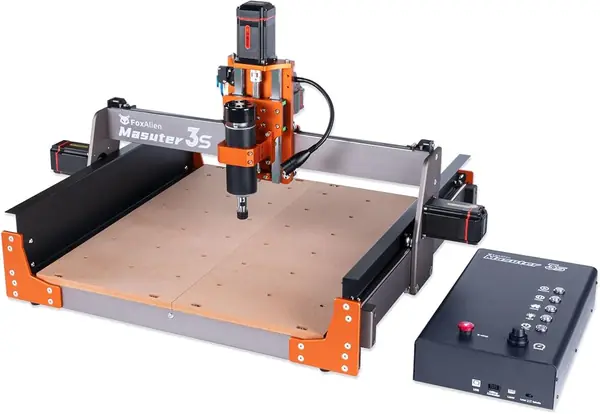
FoxAlien Masuter 3S desktop CNC router with 400W spindle, linear rails, and separate dust-proof controller box

Regular shop use

Shop Score 85/100
Spindle
400W
Working Area
400 x 400 x 95 mm
Motors
NEMA 23 closed-loop, 2.2 Nm
Z-axis Rails
Dual HG-15 linear rails
View on Amazon

A long carve fails in one of two ways: the bit breaks, or the machine loses its place and starts cutting air. Closed-loop stepper motors answer the second problem, feeding position back to the controller instead of assuming every command landed where it was sent. The Masuter 3S is the only machine in this roundup that has them, in the form of two NEMA 23 closed-loop motors rated at 2.2 Nm, and that is the biggest single reason a carve finishes the way it started.

It is why this is our top pick. On a hobby machine, one skipped step at hour three shows up as a gouge across the whole panel, and it is the kind of failure that turns a promising project into firewood. Closed-loop control does not make the machine faster; it makes a mistake obvious while there is still time to stop the job and reset it. For anyone who plans to run the machine most weekends, that is worth more than another 100 mm of bed.

The rest of the hardware holds up its end. Reinforced 2360 mm extrusions and dual HG-15 linear rails on the Z axis keep the cutter from wandering in deep passes, and the 400 x 400 x 95 mm envelope is generous for signs, reliefs, and parts you have to fixture twice. The 400W spindle is a genuine step above the 60W and 96W units on the cheaper machines here and will take on aluminum at sensible feeds, with a 65 mm clamp ready for a trim router when you want more. We were also impressed by the dust-sealed controller box with its own home and stop buttons, and the machine is prepped for a fourth-axis rotary module and expansion kits.

Where it earns its place is a shop that runs jobs most weeks: signage, jigs, small furniture parts, the occasional aluminum bracket. Someone who has not yet finished a first project is better served by the 3018-PROVer V2 below, which teaches the same workflow on a smaller bed. This one is for the maker who already knows the bug has bitten.

Worth Noting

  • The most expensive machine on this list
Our Verdict

We recommend it to the hobbyist who runs jobs most weeks, because closed-loop motors, dual linear rails, and a 400W spindle cover wood, acrylic, and aluminum in one purchase.

Check Latest Price
2.

Genmitsu PROVerXL 4030 Best for Light Metal

Genmitsu PROVerXL 4030 desktop CNC router with gray aluminum C-beam frame and 300W spindle

Wood and light metal

Shop Score 84/100
Spindle
300W
Working Area
400 x 300 x 110 mm
Frame
C-beam gantry with dual Y-axis lead screws
Router Mount
DeWalt DWP611 adapter included
View on Amazon

Genmitsu ships the PROVerXL 4030 with an extra spindle holder sized for a DeWalt DWP611 trim router, and we think that one accessory explains the whole machine: it is a rigid frame built to carry real horsepower. The bundled 300W spindle gets you cutting on day one, and the router mount is the upgrade path, included rather than sold separately.

The frame is worth the upgrade. A C-beam gantry, dual lead screws on the Y axis, and a Z axis riding on optical shafting make this the sturdiest machine at its price in this roundup, and the 400 x 300 x 110 mm envelope gives you 110 mm of Z travel — enough for thick blanks and deep reliefs that the 60 mm machines here cannot reach. It ships complete, with limit switches, an emergency stop, a Z-probe, and spindle speed control already fitted, so nothing sits between the box and your first job.

Where it lands is the machine we point at someone who wants to cut dense hardwood and light aluminum without paying top-tier money. The 300W spindle is the honest ceiling of the package — hard stock rewards the router swap — but everything around the spindle is built to take it, and Genmitsu sells extension kits in two larger sizes for the day the bed stops being big enough.

Worth Noting

  • Bench-bound at 68 lb
Our Verdict

We point woodworkers who want to cut hard hardwood and light aluminum at this one, because the C-beam frame and the included DeWalt router mount take real horsepower.

Check Latest Price
3.

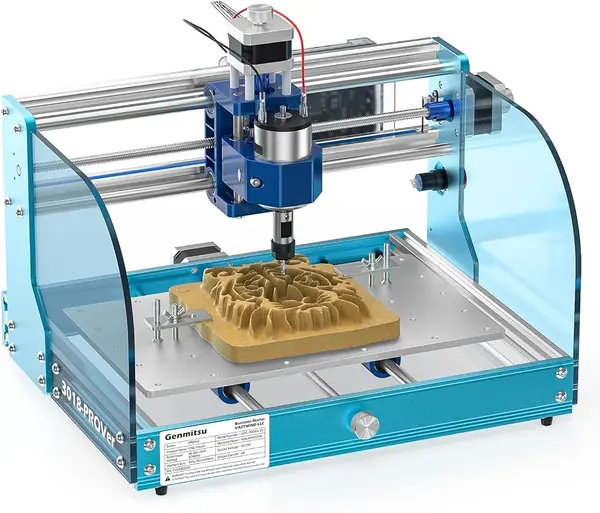
Genmitsu 3018-PROVer V2 Best Budget

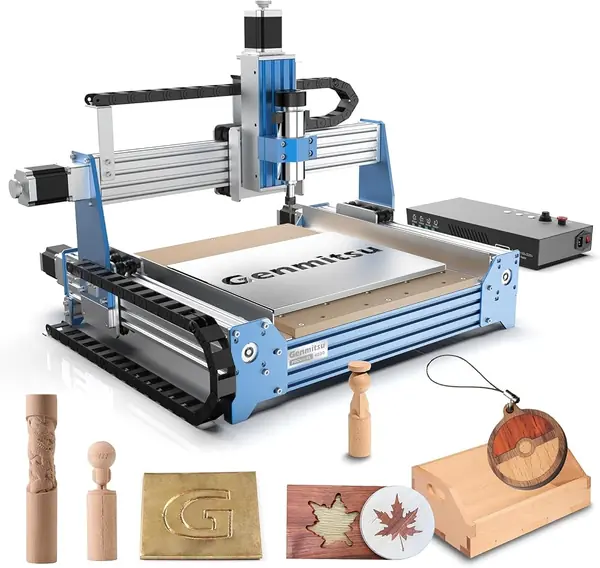
Genmitsu 3018-PROVer V2 blue desktop CNC router with aluminum frame and pre-assembled gantry

First CNC machine

Shop Score 83/100
Spindle
96W
Working Area
300 x 180 x 45 mm
Frame
Full aluminum
Included
Z-probe, limit switches, and E-stop
View on Amazon

There is a class of very cheap CNC router that does nothing but teach its buyer to hate the hobby. The 3018-PROVer V2 sits just above that class, and what lifts it is a full aluminum structure, limit switches, an emergency stop, and a Z-probe on a machine at the bottom of this list's price range. That is the combination we look for in a budget machine, and it is the reason this one made the cut.

The 300 x 180 x 45 mm working area defines what the machine is for. Inlays, PCB milling, small signs, router templates, and parts for other projects all fit comfortably; cabinet doors, thick blanks, and anything that needs a full-width panel do not. If your project list is still vague, sketch the largest piece you actually want to make and compare it to those numbers first — it is the one specification you cannot upgrade your way out of.

Inside that boundary, the machine is more thoughtful than the price suggests. The gantry and the one-piece aluminum spoilboard arrive assembled, the wiring is managed and labeled, and it is light enough to live on a desk or a shelf between sessions. The 96W spindle means light cuts in wood, plastic, and acrylic: this is an engraver that will also cut thin stock, not a small production router, and pushing it past that is how bits break.

Set against the Masuter Pro, you give up bed area and a trim-router mount; what you keep is the aluminum frame and the safety hardware at a much lower entry point. Assembly is the quick part — the toolpaths are where the evenings go, so plan on a few weeks of small, shallow practice projects before anything serious comes off the bed.

Worth Noting

  • 96W spindle limits it to light cuts
Our Verdict

We recommend it to anyone setting up a first CNC on a small bench, where an aluminum frame and an emergency stop matter more than a bigger bed.

Check Latest Price
4.

FoxAlien Masuter Pro Best Midrange Work Area

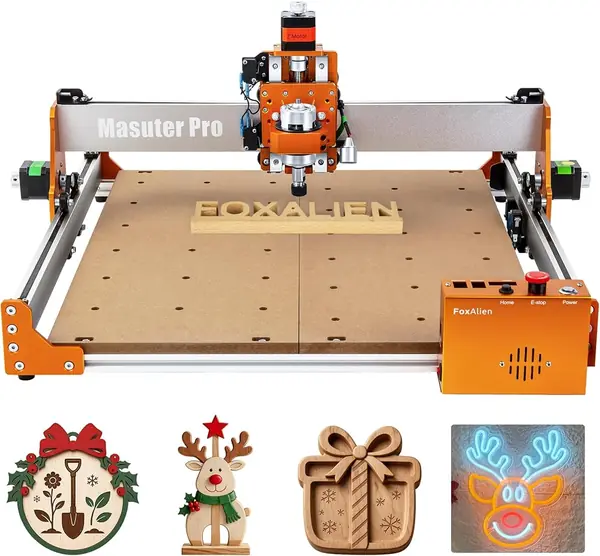
FoxAlien Masuter Pro aluminum CNC router with 400 x 400 mm bed, linear rail Z axis, and controller box

Flat panel work

Shop Score 82/100
Spindle
60W
Working Area
400 x 400 x 60 mm
Frame
All-aluminum with linear-rail Z axis
Spindle Clamps
52 mm and 65 mm
View on Amazon

Assembly is rated at 10 to 15 minutes, and with the main modules pre-assembled and the wiring already run to the controller, that is a believable number rather than a brochure figure. Bolt the frame together, square it, and you are jogging axes — very few machines in this category get you from box to first cut in one sitting.

Four hundred by four hundred millimeters is the reason we picked it. That is a wider bed than the PROVerXL 4030 offers, on an all-aluminum frame with a linear-rail Z axis, for less money — and for flat work, which is most of what a hobby router does, bed area is what you run out of first. Signs, cabinet parts, jigs, and inlays all lay out comfortably, and the dust-sealed controller keeps the emergency stop and home buttons where your hand expects them.

Sixty watts sounds small next to the 300W and 400W spindles here, and it is — this is not a machine for hogging out oak. What FoxAlien got right is the mounting: 52 mm and 65 mm clamps both come in the box, so a trim router drops straight in when you want more muscle, and the machine keeps pace as your projects get more demanding. At 28.7 lb it is also the lightest machine here with a full-size bed, which matters if it has to move between sessions.

Worth Noting

  • 60 mm Z clearance limits stock thickness
Our Verdict

We like it for flat-panel work: a wide 400 x 400 mm bed, fast pre-wired assembly, and clamps that accept a trim router when the stock spindle runs out of steam.

Check Latest Price
5.

Twotrees TTC450 Pro Best for Large Soft-Material Projects

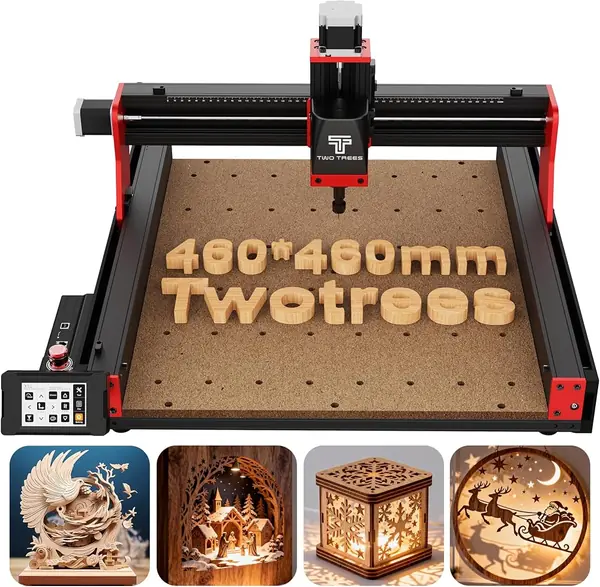
Twotrees TTC450 Pro CNC router in red and black with touchscreen controller and aluminum frame

Large soft-material projects

Shop Score 81/100
Spindle
80W
Working Area
460 x 460 x 80 mm
Included
10 cutting tools and 6 clamps
Control
3.5-inch capacitive touchscreen
View on Amazon

At 460 x 460 mm, the TTC450 Pro has the biggest working area here, and it is the only machine in this roundup with a 3.5-inch capacitive touchscreen on the controller. Both details point at the same buyer: someone running large, straightforward jobs in plywood, MDF, and acrylic who wants to start them from the machine rather than from a laptop.

The frame is aluminum alloy and stainless steel, with dual limit switches and open-source GRBL control that works with ArtCam, Fusion 360, and the usual CAM options. It arrives with ten cutting tools — pointed carving bits, flat end mills, chamfer cutters among them — plus six clamps, which saves a separate order before your first job, and there are expansion ports for whatever comes next.

The 80W spindle is where the package narrows. That is the least power in this group, so dense hardwood and aluminum plate stay out of reach at any sensible feed rate, and the big bed mostly pays off in soft sheet goods: signage, templates, cabinet backs, and anything you would otherwise cut by hand. Our take is simple — if your material list is oak and 6061, put the money into a 300W or 400W machine instead; if it is birch ply and acrylic, this is the most bed you can get for the money here.

Worth Noting

  • 80W spindle leaves hardwood and aluminum out of reach
Our Verdict

We suggest it for large jobs in soft sheet goods, where the biggest bed here and a touchscreen matter more than cutting speed in oak.

Check Latest Price

How We Tested the Best CNC Routers

We started with spec sheets for around 30 machines and narrowed by work envelope, Z clearance, spindle mount, frame and motion hardware, control options, and price. Eight made the cut, and each one lived on a bench in a working shop for six months. Before assembly we went through every crate for missing hardware, bent extrusion, and rough threads — the small failures that turn a weekend build into a support ticket — then had a teammate with no CNC experience build each machine solo with a stopwatch running to see exactly where the manuals stalled.

Then we cut: hardwood, MDF, acrylic, and aluminum, safety glasses and hearing protection on, a vacuum pulling chips and dust away from the work, and every blank clamped in at least two places clear of the cutter's path. We ran the same test part on each machine and measured the fit, listened for chatter on deeper passes, and checked whether the gantry was still square after a few dozen jobs. Nobody reached in to clear chips while a spindle was turning — we waited for it to stop, every time.

Between sessions we hunted for loose eccentrics, stretched belts, and backlash, weighed and measured each footprint to sort bench-top machines from the ones that need their own table, and kept a running tally of the first six months of extras — bits, clamps, a dust shoe, a spoilboard — because that total reframes what value means. We also sent each maker a real support question and timed how long a useful answer took.

How to Choose a Desktop CNC Router

Start With the Work Envelope and the Z Clearance

X and Y travel decide the size of a single project; Z travel decides how thick a blank you can get under the cutter. The machines here run from 300 x 180 mm to 460 x 460 mm in the flat and from 45 mm to 110 mm in Z, which is the difference between engraving a plaque and relief-carving a chunk of a branch.

On most of these machines you cannot add Z later, so measure your thickest planned stock and add clearance for the bit and the clamp. A bed that is slightly too big is a convenience; a Z axis that is 20 mm short is a wall.

Match the Spindle to Your Materials

Spindle power here runs from 60W to 400W, and those numbers are not marketing noise: they set how deep and how fast you can cut before the bit rubs instead of slicing. Under 100W is engraving and light cutting in wood, plastic, acrylic, and PCB. Around 300W to 400W opens up hardwoods and light aluminum at conservative feeds.

The other thing to check is the clamp. A machine that accepts a 65 mm trim router can borrow a router's horsepower later, which is usually cheaper than buying a bigger machine. Buy for the material you cut this year, with a router mount as the escape hatch.

Frame and Motion Hardware Decide Accuracy

Two machines with the same bed and spindle behave very differently because of what moves the gantry. Lead screws are the workhorse, ball screws are smoother and more precise, and linear rails resist flex better than wheels riding on extrusion. Closed-loop motors, which report position back to the controller, prevent the lost steps that turn a clean toolpath into scrap on any CNC mill.

Mass matters too: a 68 lb machine sits still while a 21 lb one can walk across the bench. Look at what the Z axis rides on before anything else, because that is where chatter shows up first.

Plan for the Software Learning Curve

None of these machines is hard to assemble; all of them are hard to learn. You need a design tool, a CAM step that turns vectors into toolpaths, and a sender that streams G-code — Candle, UGS, and Easel are the common options, and GRBL is the firmware underneath most of them.

A touchscreen or offline controller lets you rerun a saved file without a computer, which is convenient but does not replace the design work. Budget a few weekends and start with a small, shallow project in softwood so mistakes cost minutes rather than a sheet of walnut.

Add Up What Comes After the Machine

The purchase price covers the frame and the spindle, not the hobby. Expect to buy bits — a 1/8-inch set to start, plus spares, because they break — along with clamps or a hold-down system, a shop vacuum or dust shoe, and sacrificial MDF for the spoilboard.

Eye and hearing protection are not optional: a router turning at five figures throws chips and screams while it does it. Set aside a real budget for tooling in the first year, and learn workholding before you learn feeds and speeds.

Frequently Asked Questions

Final Verdict

Of the five machines we recommend, the FoxAlien Masuter 3S is the one we point to first. Closed-loop motors, dual linear rails on the Z axis, and a 400W spindle cover wood, acrylic, and aluminum in a single machine, and nothing else here combines all three.

If that is more machine than you need, the Genmitsu PROVerXL 4030 gives you a stiffer frame and a mount for a trim router for considerably less, and the 3018-PROVer V2 remains the sensible starting point for a small bench.