↑↓ navigate ↵ open Esc close All results →

Best Router Templates for Woodworking of 2026

Riding a guide bushing inside a router template turns complex shapes into repeatable passes—until thin plastic flexes under the router base and lets the bit climb the edge into the workpiece. When a stencil stays flat and clamped firmly, letters, mortises, and rounded corners come off the router accurately on the first run.

We routed pine signs, door hinge mortises, and charcuterie board corners with 12 templates and jigs over nine months, where a single mismatched guide bushing quickly showed how bushing diameter alters the finished opening rather than just the fit. Template stiffness proved more reliable than material hype, since rigid plates resist bowing under router weight better than flimsy acrylic.

Rather than expecting one universal jig to cover every cut, the options reviewed here divide into dedicated lettering sets, hinge mortise guides, corner-radius templates, and handle cutouts.

Our Top Picks

The Best Router Templates for Woodworking

1.

Milescraft 1212 SignPRO Sign Making Kit Best Overall
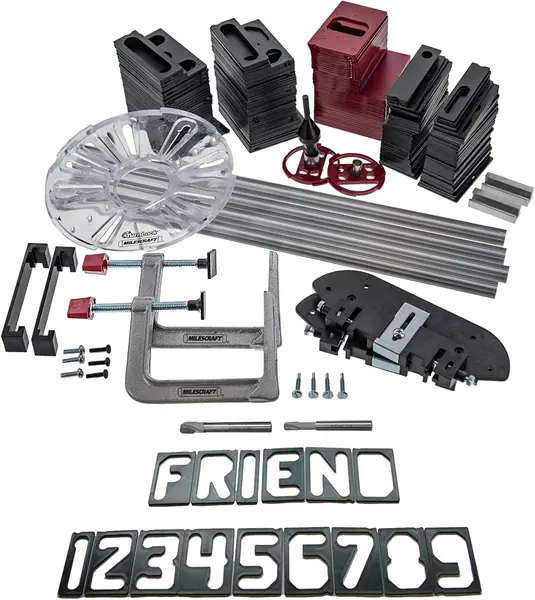
Milescraft 1212 SignPRO sign-making kit with polymer letter templates, two router bits, bushings, and clamps

Sign making

Shop Score 89/100
Characters
246 templates: 166 letters, 80 numbers
Bits Included
1/4 in. and 3/8 in. core box
Letter Heights
1.5 in. and 2.5 in.
Max Sign Length
36 in.
View on Amazon

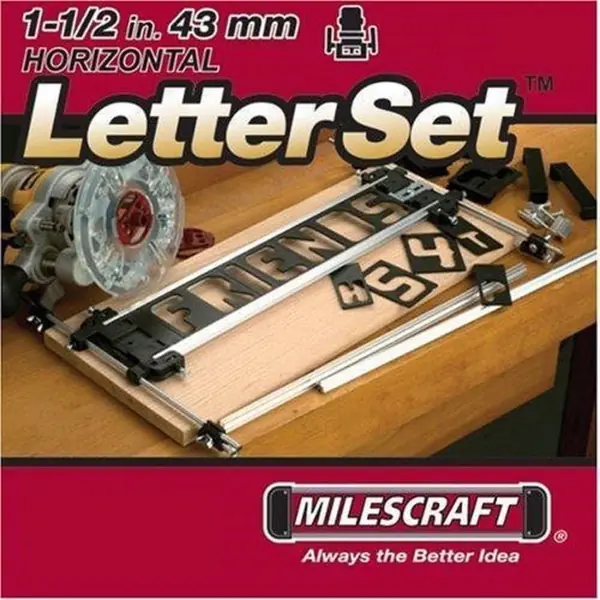
Everything needed for a first sign is in the box: 166 horizontal characters in 1.5- and 2.5-inch heights, 80 vertical numbers, a 1/4-inch and a 3/8-inch carbide-tipped core box bit, a turn-n-lock base plate with metal-nose bushings, and two low-profile C-clamps. That completeness is why this is the one we hand to most woodworkers. You clamp the rails to the workpiece, drop a character into the frame, and the bushing carries the router around the inside of the letter.

Self-spacing is the feature we appreciate most. Characters lock into the frame at the right interval, so a name goes together without pencil marks between letters, and signs up to 36 inches are within reach. The redesigned end frames and the rails that sit on the work surface steady the whole frame while the router travels, which matters most on a long board where the frame spans the greatest distance. Metal-nosed bushings are the part that wears when you rout hundreds of characters, and those are what Milescraft put in the box.

The characters themselves are a polymer blend, so they want the tray they came in and a flat shelf rather than a coffee can of offcuts; a letter with a nicked inner edge transfers that nick to every sign after it. It is also a specialist: this kit letters signs beautifully and will not round a tabletop corner or cut a hinge mortise, which is exactly why a radius plate and a hinge jig live on the same shelf in our shop.

Worth Noting

  • Polymer characters need flat storage to stay accurate
Our Verdict

Our top pick because it is the only kit here that arrives with the characters, both bits, the bushings, and the clamps, turning a router into a sign-making tool in one order.

Check Latest Price
2.

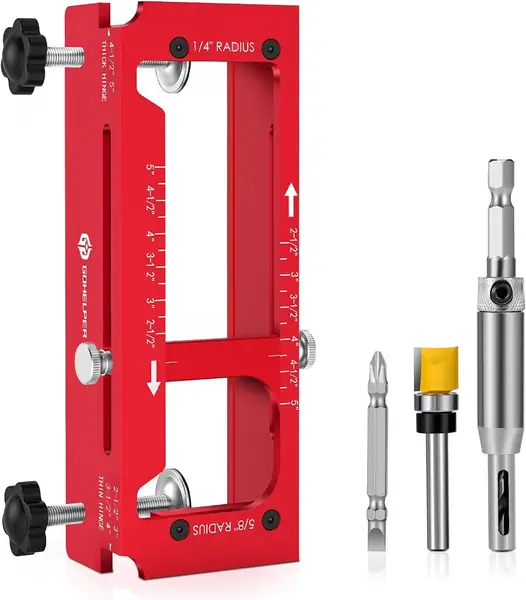
Gohelper Door Hinge Jig Best for Hanging Doors

Gohelper red aluminum door hinge jig with built-in depth gauge and included router bit

Hanging doors

Shop Score 88/100
Material
6061 aluminum, anodized
Included
Router bit, self-centering bit, screwdriver bit
Hinge Lengths
2.5 in. to 5 in.
Corner Options
1/4 in. R, 5/8 in. R, square
View on Amazon

Aluminum is the whole argument. The body is machined 6061 alloy with an anodized finish and 8.6 inches of face, and it lies flat on a door so a compact router has a solid deck to ride. We paid close attention to flex when we set it in place, because a hinge jig that bows under the router cuts a mortise that is not the depth you set.

Setup takes a minute: turn the clamp screw to lock the jig to the door, set the bit against the built-in gauge for thin hinges at 2-1/2 through 4 inches or thick ones at 4-1/2 and 5 inches, and rout. Removable corner inserts swap between a 1/4-inch radius, a 5/8-inch radius, and square, though a square corner still wants a chisel for the last sliver. The router bit, a self-centering hinge bit, and a double-ended screwdriver bit come with it, which is the difference between starting the job and ordering again.

What it does not do is the jamb side, so a full door-and-frame job needs a second jig. For slabs on their own, the aluminum body and clamp are built for a run of doors rather than a single Saturday, and it has the registration to prove it on every hinge after the first.

Worth Noting

  • Door-side mortises only, not the jamb
Our Verdict

We recommend it for door slabs: an anodized aluminum body, a built-in depth gauge, and the bit included make hinge mortises a routing job instead of a chiseling one.

Check Latest Price
3.

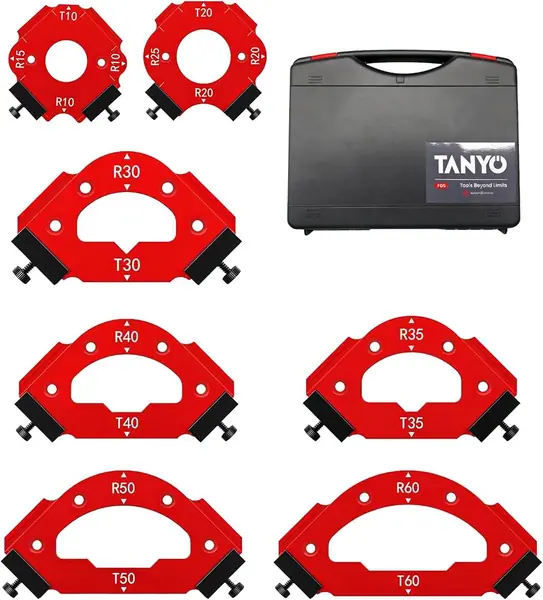
TANYO 7-Piece Router Corner Radius Template Best for Corner Radii

TANYO seven-piece aluminum corner radius template set in a plastic storage case

Rounded corners

Shop Score 87/100
Pieces
7
Material
CNC-machined aluminum, anodized
Storage
Plastic case
Radius And Bevel Range
R10 to R50, T10 to T60
View on Amazon

Eight radii from R10 to R50 plus a run of bevel profiles from T10 to T60, spread across seven CNC-machined aluminum plates in a plastic case: this is the set for someone who rounds corners often enough to want the whole range in one box. The case matters more than it sounds, because a template that has been rattling loose in a drawer no longer registers flat.

The adjustable edge stops are what make the style work. Set the stop against the workpiece edge, tighten, and the guide rail lands the same radius on every corner, so four table legs match without a layout line anywhere. We like that the stops are separate from the profile itself, so the jig can be repositioned on the corner without swapping plates, and that the surface is anodized rather than raw, since raw aluminum drags on the router base.

The bevel rails take a test cut on scrap to dial in; the same is true of any multi-profile guide, and it is the difference between a clean chamfer and a stepped one. If your work is shelf ends and tabletop corners, eight radii and a run of bevels covers it, and the extra plates pay for themselves the first time a job calls for a radius you do not own.

Worth Noting

  • Costs more than the two-plate radius sets here
Our Verdict

For anyone cutting corners regularly, we think the seven-plate set earns its keep with 18 profiles and stops that repeat a radius across a whole batch.

Check Latest Price
4.

Milescraft 2202 Horizontal Character Template Set Best Lettering Add-On

Milescraft 2202 polymer character template set with letters, numbers, and punctuation

Lettering expansion

Shop Score 86/100
Pieces
41 templates
Coverage
A-Z, 0-9, punctuation, spacer
Warranty
2 years
Character Height
1.5 in.
View on Amazon

Forty-one characters, and the self-spacing comes from the frame rather than the letters. They are cut to sit in a Milescraft SignPro or SignCrafter rail, where they lock in at the correct interval: A through Z with an extra A, E, and I, digits 0 through 9, a period, an apostrophe, a dash, and a blank spacer. Loose on a workpiece they slide, which is the one thing to understand before you order.

The extras are what you are buying. Repeated vowels and punctuation are what force you to hand-space a name, and the spacer lets you open a gap between words instead of eyeballing it. We think 1.5 inches is the right height for house numbers, small gifts, and cutting boards; characters crowd quickly on narrow stock once you go bigger. The polymer letters are individually replaceable, so one chipped character is a small order rather than a new set, and the whole thing carries a two-year warranty.

The stack measures 5.95 by 3.4 inches, small enough to live in the same drawer as the frame instead of taking a shelf of its own. Keep the pencil away from the inner edges of the openings, since the template edge is what the bushing rides and any burr shows up in the cut.

Worth Noting

  • One of each digit and punctuation mark
Our Verdict

Add this expansion set to a Milescraft sign kit for 41 characters with the punctuation and repeat vowels that make layouts work, for very little money.

Check Latest Price
5.

Draxzor 2-Pack Router Corner Radius Templates Best for Small Corner Jobs

Draxzor two-piece aluminum corner radius template set with adjustable edge stops

Small corner jobs

Shop Score 85/100
Pieces
2
Material
Aluminum alloy, CNC-machined
Radii
R10 to R50, eight sizes
Plate Sizes
5.1 x 5.1 in. and 3.3 x 3.3 in.
View on Amazon

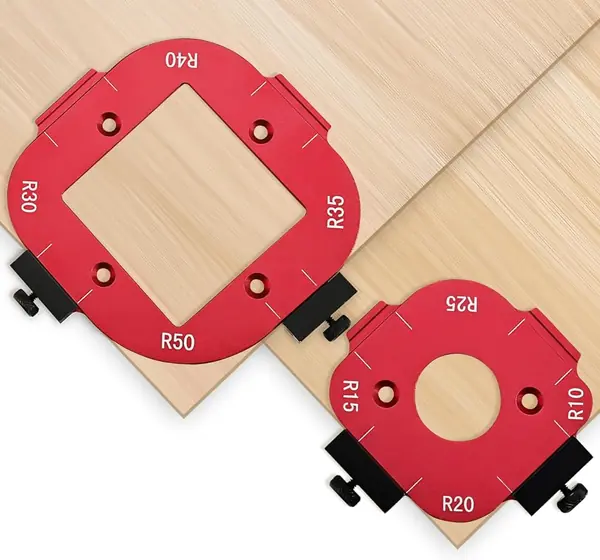
Two plates and eight radii, and the aluminum runs all the way through: the edge clamps are alloy too, not plastic tabs screwed to a plate. That combination makes this the least expensive way into aluminum corner templates here, which is the reason it earns a place on the page.

Eight radii from R10 to R50 across a 5.1-inch plate and a 3.3-inch plate cover trim, small panels, and shelf ends, and the adjustable stops let you set the jig against an edge and repeat the same corner. What struck us is the weight: 8 ounces for the pair means it rides in the router case and comes out for a single corner rather than an afternoon's setup.

The smaller plate leaves limited room for a clamp, so on thin stock plan on firm hand pressure or a strip of double-sided tape. The compact size that makes it handy is the same size that limits how you hold it, and for a batch of small parts that is the right trade.

Worth Noting

  • Limited clamp room on the smaller plate
Our Verdict

Anyone rounding a few corners on small parts gets eight aluminum radii in a package that disappears into a router case.

Check Latest Price
6.

Frienda Acrylic Charcuterie Board Templates Best for Board Handles

Frienda clear acrylic charcuterie board handle templates with three marking pens

Board handles

Shop Score 84/100
Pieces
6 templates, 3 pens
Material
Acrylic
Thickness
0.2 in. (5 mm)
Template Size
9.84 x 7.87 in.
View on Amazon

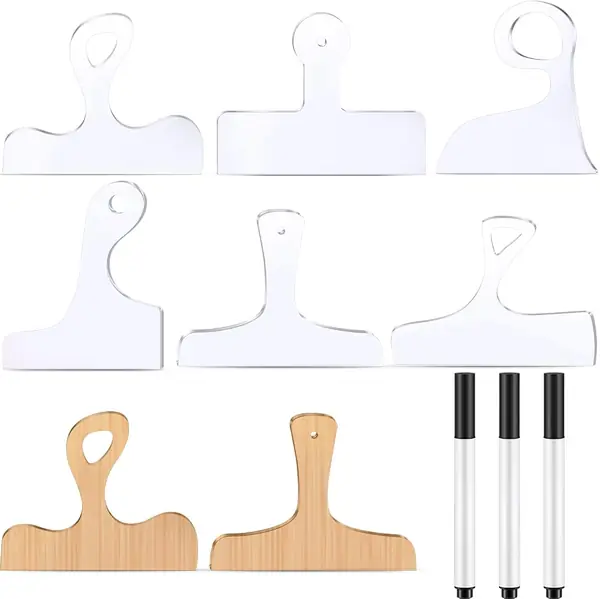
Six acrylic outlines for the handle end of a charcuterie board, 0.2 inch thick and about 9.84 by 7.87 inches, covering straight, curved, and a few novelty profiles. These are layout templates rather than bushing-guided jigs: you set one on the blank, trace around it with one of the three included pens, and cut to the line.

We appreciate the thickness more than the shapes. A template that stiff still sits above the workpiece without curling when you press a pen against it, which is more than a printed paper pattern manages, and the protective film on both faces keeps the acrylic clear enough to see the workpiece edge through while you align it.

The maker's instructions stop at trace and cut, so plan on a jigsaw, a spindle sander, or a router table with a pattern bit, and clamp the template firmly if you take the routing route. What the set actually buys is consistency: pick one profile and every board in a batch gets the same handle, which is the part that is hard to do freehand.

Worth Noting

  • Traces the outline; a saw still makes the cut
Our Verdict

We like it for board makers who want repeatable handles: six thick acrylic outlines that keep every board in a batch identical.

Check Latest Price

How We Tested the Router Templates

We started with the shape, not the kit. For each job — letters and numbers, hinge mortises, corner radii, board outlines — we looked at what the template actually reproduces, then filtered out anything that didn't state a guide-bushing opening, a character height or radius range, or a way to register the jig against an edge. We also weighed how many sizes or characters a set covers against what ships in the box, since a cheap template that needs a bit and a bushing bought separately isn't the bargain it looks like. Twelve made the cut.

Those 12 lived in the shop for nine months. We routed characters at both common sign heights into pine and poplar blanks, hung a hallway's worth of doors with hinge templates set for square corners and two round-over options, rounded the corners on trim offcuts and a run of charcuterie boards, and traced handle shapes onto boards before cutting them. Every template got clamped the way a buyer would at the bench, and we kept the router base flat and moved clockwise so the bit stayed inside the jig.

At each setup we watched for the things shoppers ask about: whether a jig shifted mid-cut, whether letters came out crisp on the first pass or needed filing, how much fuss the adjustment screws took to dial in, and whether the plate went back in its case still square. We made a trial cut on scrap of the same stock before every new material, and we matched bushing to bit before the first pass. Durability showed up as wear and rounded edges around the opening after repeated cuts; value came down to bits, storage, and warranty included.

How to Choose Router Templates for Woodworking

Start With the Shape, Not the Kit

Router templates divide into four jobs: characters for signs, mortise jigs for hinges, radius plates for corners, and outline patterns for board handles and similar shapes. Each has its own sizing logic, meaning character height for lettering, hinge length for doors, and radius range for corners. Decide which one is on your bench before you shop.

A sign kit that handles 36-inch boards will not touch a door, and a hinge jig sized for 2-1/2 to 5 inch hinges is the only thing that will. Buying across purposes is the most common mismatch we see, and it usually starts with a shopper buying the jig that looks most useful rather than the one that matches the next three projects.

Aluminum, Polymer, and Why Rigidity Matters

A router pushes down on the template while the bit pulls sideways against the opening, and any flex in the plate shows up in the cut. A jig that bows cuts a mortise deeper at one end, and a template that lifts lets the bit wander outside the shape. Aluminum router jigs earn their price where the router base rides the whole plate, as on the Gohelper hinge jig.

Polymer is fine for characters held inside a rigid frame, provided you store them flat and keep the inner edges clean. On any rail that spans a board, clamp both ends; a single clamp at one end lets the far end lift exactly where the router is working.

Match the Template to Your Router and Bushing

A guide bushing rides the template opening and offsets the cut by the difference between the bushing's outside diameter and the bit. If that offset does not suit the template's collar recess, the character comes out oversize or undersize no matter how carefully you clamp it down.

Compact routers run 1/4-inch shank bits and often need a bushing adapter plate. Buy the kit that includes its own bushings, as the SignPRO does, and check what is actually in the box on a radius plate before assuming a bit comes with it, since most sets here ship templates only.

Clamping and Registration Decide the Cut

A template is only as good as the way it holds still. Edge stops register a radius plate against two faces, a clamp screw and non-slip pads hold a hinge jig to a door, and low-profile clamps keep the clamp head below the router base so the base can travel the whole frame.

Work out where the clamp goes before the first pass, and keep double-sided tape on the bench for thin stock where a clamp will not fit. Set the template, cut scrap, then commit to the workpiece.

Frequently Asked Questions

Final Verdict

Most woodworkers shopping for router templates want one box that turns a router into a sign-making, shape-repeating tool, and the Milescraft SignPRO is that box: 246 self-spacing characters, both core box bits, the bushings, and the clamps. It is the default we point people to first.

If your work is doors rather than signs, the Gohelper jig is the better buy, with an aluminum body sized for 2-1/2 to 5 inch hinges and the bit included. And if your corners are the problem, the TANYO set covers radii that a two-plate jig cannot.